Microsoft Fabric · Spatial analytics
Run spatial analysis inside Microsoft Fabric
How ArcGIS GeoAnalytics works with Fabric Spark, including data flow, supported analysis patterns, licensing, and network constraints.

ArcGIS GeoAnalytics adds Esri map and location tools to Fabric Spark. Teams can use the library in Spark notebooks and job definitions. This keeps spatial data work close to other Fabric data tasks.
Microsoft lists the link as generally available. Its ArcGIS GeoAnalytics for Fabric guide sets out the current scope, setup, license, and limits.
Where the library fits
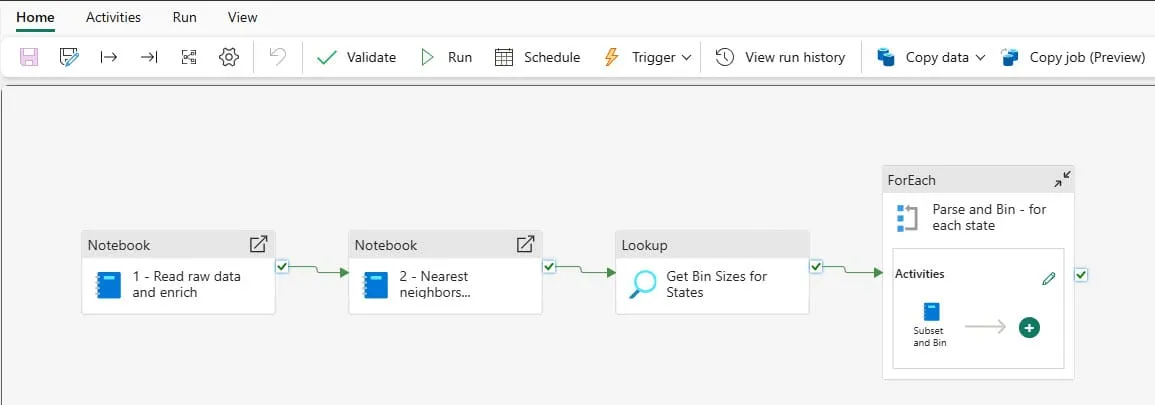
The library can read spatial data from OneLake and supported ArcGIS services. It can turn coordinates or common map formats into geometry for Spark.
Teams can use it to:
- join data by place;
- find nearby items;
- study travel and dwell time;
- find clusters and hot spots;
- group results for reports.
The results can go back to OneLake. Other Fabric tools, such as Power BI, can then use them. Some file types do not store geometry in its native form, so test the chosen output format.
Enablement and licence are separate
A tenant admin can turn the library on or off. A capacity admin can also set it for one capacity. The code comes with the Fabric runtime, but its tools still need a valid Esri sign-in or API key.
The tools use Esri technology and need a separate Esri licence. Check the terms, capacity needs, and support owner before live use.
The network path leaves Fabric
Microsoft says the engine calls Esri services for sign-in and usage tracking. Those calls leave Fabric. The feature does not work when Fabric Outbound Access Protection is on.
This may rule out the tool in a locked-down setting. Review the outbound rules, key storage, data location, source access, and incident path with security staff.
Start with one map question
Choose one clear task. You might find assets within a set range, group events by area, or spot where a vehicle stayed.
Then test:
- source geometry and map reference system;
- data size and split;
- results and edge cases;
- run time and capacity use;
- output format and next tool;
- licence, network, and support needs.
This test shows whether the whole Fabric path works. A sample notebook alone cannot prove that.

Microsoft Fabric
Microsoft Fabric: Platform Overview for Data Teams
A sourced guide to OneLake, engineering, warehousing, real-time analytics, Power BI, governance, and Copilot in Microsoft Fabric.

Microsoft Fabric
Synthetic Data for AI: Privacy, Utility, and Fabric
Learn where synthetic data helps AI teams, which privacy risks remain, and how Microsoft Fabric can support a governed workflow.
Microsoft Fabric
Microsoft Fabric Database Hub: An Early-Access Guide
A review of Database Hub's early-access scope, supported Microsoft databases, governance model, and operational boundaries.
Test spatial analytics against a real workload
Bring the source format, scale, spatial operation, licence, and network constraints.
'%3e%3cpath%20style='%20stroke:none;fill-rule:nonzero;fill:%230078d4;fill-opacity:1;'%20d='M%20130.835938%200.808594%20L%20246.300781%200.808594%20L%20126.433594%20355.867188%20C%20125.824219%20357.679688%20124.929688%20359.386719%20123.792969%20360.925781%20C%20122.65625%20362.46875%20121.285156%20363.816406%20119.726562%20364.933594%20C%20118.171875%20366.050781%20116.457031%20366.917969%20114.628906%20367.5%20C%20112.804688%20368.085938%20110.902344%20368.386719%20108.992188%20368.386719%20L%2019.128906%20368.386719%20C%2016.214844%20368.386719%2013.335938%20367.695312%2010.742188%20366.359375%20C%208.144531%20365.03125%205.902344%20363.097656%204.199219%20360.726562%20C%202.496094%20358.355469%201.382812%20355.613281%200.949219%20352.730469%20C%200.515625%20349.84375%200.78125%20346.894531%201.710938%20344.132812%20L%20113.386719%2013.320312%20C%20113.996094%2011.507812%20114.890625%209.800781%20116.03125%208.261719%20C%20117.167969%206.722656%20118.542969%205.371094%20120.09375%204.253906%20C%20121.648438%203.140625%20123.367188%202.273438%20125.191406%201.6875%20C%20127.015625%201.101562%20128.917969%200.800781%20130.832031%200.800781%20L%20130.832031%200.804688%20Z%20M%20130.835938%200.808594%20'%3e%3c/path%3e%3c/g%3e%3cg%20clip-rule='nonzero'%20clip-path='url(%23b1ce87f571)'%3e%3cpath%20style='%20stroke:none;fill-rule:nonzero;fill:%2302b2fe;fill-opacity:1;'%20d='M%20485.054688%200.800781%20L%20404.832031%200.800781%20C%20391.472656%200.800781%20380.636719%2011.625%20380.636719%2024.976562%20L%20380.636719%20316.339844%20L%20278.34375%2013.316406%20C%20278.03125%2012.417969%20277.679688%2011.5625%20277.210938%2010.703125%20C%20276.78125%209.84375%20276.273438%209.027344%20275.6875%208.246094%20C%20275.414062%207.855469%20275.101562%207.503906%20274.792969%207.15625%20C%20274.441406%206.765625%20274.128906%206.414062%20273.777344%206.101562%20C%20273.113281%205.402344%20272.410156%204.816406%20271.628906%204.269531%20C%20270.070312%203.140625%20268.351562%202.28125%20266.558594%201.695312%20C%20264.722656%201.113281%20262.8125%200.800781%20260.898438%200.800781%20L%20132.210938%200.800781%20C%20134.121094%200.800781%20136.03125%201.113281%20137.867188%201.695312%20C%20139.660156%202.28125%20141.378906%203.140625%20142.941406%204.269531%20C%20145.671875%206.21875%20147.816406%208.871094%20149.144531%2011.949219%20C%20149.222656%2012.144531%20149.300781%2012.300781%20149.339844%2012.496094%20C%20149.457031%2012.769531%20149.574219%2013.042969%20149.652344%2013.316406%20L%20261.328125%20344.128906%20C%20261.367188%20344.246094%20261.40625%20344.363281%20261.40625%20344.480469%20L%20265.269531%20355.863281%20C%20265.894531%20357.695312%20266.792969%20359.375%20267.921875%20360.933594%20C%20269.054688%20362.453125%20270.421875%20363.816406%20271.980469%20364.949219%20C%20273.542969%20366.039062%20275.257812%20366.898438%20277.054688%20367.484375%20C%20278.886719%20368.066406%20280.800781%20368.378906%20282.710938%20368.378906%20L%20404.660156%20368.378906%20C%20404.71875%20368.378906%20404.773438%20368.386719%20404.832031%20368.386719%20L%20485.054688%20368.386719%20C%20498.417969%20368.386719%20509.25%20357.566406%20509.25%20344.214844%20L%20509.25%2024.976562%20C%20509.25%2011.625%20498.417969%200.800781%20485.054688%200.800781%20Z%20M%20485.054688%200.800781%20'%3e%3c/path%3e%3c/g%3e%3c/g%3e%3c/svg%3e)