Azure governance · Access guide
Use Azure RBAC to limit access by role
Learn how security principals, role definitions, and scope work together in Azure RBAC, with practical governance and access examples.

Azure role-based access control, or Azure RBAC, determines who can access Azure resources, which operations they can perform, and where those permissions apply.
It is an authorisation system built on Azure Resource Manager. It should sit alongside identity protection, network controls, resource policy, logging, data-plane permissions, and operational review.
What a role assignment is made of
Security principal
A security principal is the identity receiving access. It can be a user, group, service principal, or managed identity.
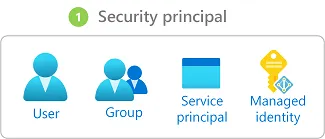
Use groups and workload identities where practical. Direct user assignments are harder to review and remove at scale.
Role definition
A role definition lists allowed control-plane actions and, where supported, data actions. Azure includes built-in roles, and organisations can create custom roles when a built-in role grants too much or too little.
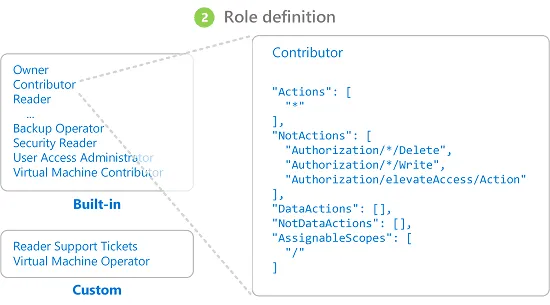
“Contributor” is not a harmless default. Select the narrowest role that supports the task and review privileged permissions separately.
Scope
Scope defines where the assignment applies:
- management group
- subscription
- resource group
- individual resource
Assignments at a higher level are inherited below that point. A broad scope increases the effect of a compromised account or mistaken change.
Microsoft’s scope guidance explains the hierarchy and inheritance behaviour.
Separate control-plane and data access
Permission to manage a resource does not always provide access to the data inside it. Azure role definitions distinguish management actions from data actions for services that support that model.
Check both planes. A person may need to configure a storage account without reading blobs, or read data without changing the resource.
Also review access paths that bypass Entra-based RBAC, such as account keys or service-specific credentials.
Apply least privilege to real tasks
Start with what the person or workload must do:
- which resource types
- which operations
- which environment
- for how long
- through which identity
- with which approval
Test the role in the intended scope. Do not add broad permissions to resolve an unexplained authorisation error.
Govern privileged access over time
RBAC becomes an operating control when assignments have owners and review dates.
A practical review asks:
- Which assignments were added or removed?
- Which users receive access through nested groups?
- Which service principals or managed identities are inactive?
- Which custom roles changed?
- Which privileged assignments are permanent?
- Which resources still use keys or shared credentials?
Record emergency access separately and test how it is activated, monitored, and revoked.
Understand the compliance boundary
RBAC can support separation of duties and least privilege. It does not prove that an Azure environment meets a regulation or certification.
Compliance also depends on data handling, configuration, monitoring, incident response, evidence, and human process. State the control RBAC supplies rather than describing it as a complete compliance solution.
Microsoft’s Azure RBAC overview is the maintained source for principals, roles, scope, assignments, and licensing requirements.

Learning
Data Governance for Financial Services
A practical guide to ownership, quality, access, retention, and regulatory checks for financial-services data teams.

Learning
Data Strategy for Financial Services
Connect business goals to data ownership, architecture, analytics, governance, and operating responsibilities.

Learning
Data-Driven ISO 27001 and ISO 9001 Certifications
Understand what Data-Driven's ISO 27001 and ISO 9001 certifications cover, how external audits work, and what clients should verify.
Review access as an operating control
Map identities, roles, scopes, privileged paths, and review ownership across the Azure estate.
'%3e%3cpath%20style='%20stroke:none;fill-rule:nonzero;fill:%230078d4;fill-opacity:1;'%20d='M%20130.835938%200.808594%20L%20246.300781%200.808594%20L%20126.433594%20355.867188%20C%20125.824219%20357.679688%20124.929688%20359.386719%20123.792969%20360.925781%20C%20122.65625%20362.46875%20121.285156%20363.816406%20119.726562%20364.933594%20C%20118.171875%20366.050781%20116.457031%20366.917969%20114.628906%20367.5%20C%20112.804688%20368.085938%20110.902344%20368.386719%20108.992188%20368.386719%20L%2019.128906%20368.386719%20C%2016.214844%20368.386719%2013.335938%20367.695312%2010.742188%20366.359375%20C%208.144531%20365.03125%205.902344%20363.097656%204.199219%20360.726562%20C%202.496094%20358.355469%201.382812%20355.613281%200.949219%20352.730469%20C%200.515625%20349.84375%200.78125%20346.894531%201.710938%20344.132812%20L%20113.386719%2013.320312%20C%20113.996094%2011.507812%20114.890625%209.800781%20116.03125%208.261719%20C%20117.167969%206.722656%20118.542969%205.371094%20120.09375%204.253906%20C%20121.648438%203.140625%20123.367188%202.273438%20125.191406%201.6875%20C%20127.015625%201.101562%20128.917969%200.800781%20130.832031%200.800781%20L%20130.832031%200.804688%20Z%20M%20130.835938%200.808594%20'%3e%3c/path%3e%3c/g%3e%3cg%20clip-rule='nonzero'%20clip-path='url(%23b1ce87f571)'%3e%3cpath%20style='%20stroke:none;fill-rule:nonzero;fill:%2302b2fe;fill-opacity:1;'%20d='M%20485.054688%200.800781%20L%20404.832031%200.800781%20C%20391.472656%200.800781%20380.636719%2011.625%20380.636719%2024.976562%20L%20380.636719%20316.339844%20L%20278.34375%2013.316406%20C%20278.03125%2012.417969%20277.679688%2011.5625%20277.210938%2010.703125%20C%20276.78125%209.84375%20276.273438%209.027344%20275.6875%208.246094%20C%20275.414062%207.855469%20275.101562%207.503906%20274.792969%207.15625%20C%20274.441406%206.765625%20274.128906%206.414062%20273.777344%206.101562%20C%20273.113281%205.402344%20272.410156%204.816406%20271.628906%204.269531%20C%20270.070312%203.140625%20268.351562%202.28125%20266.558594%201.695312%20C%20264.722656%201.113281%20262.8125%200.800781%20260.898438%200.800781%20L%20132.210938%200.800781%20C%20134.121094%200.800781%20136.03125%201.113281%20137.867188%201.695312%20C%20139.660156%202.28125%20141.378906%203.140625%20142.941406%204.269531%20C%20145.671875%206.21875%20147.816406%208.871094%20149.144531%2011.949219%20C%20149.222656%2012.144531%20149.300781%2012.300781%20149.339844%2012.496094%20C%20149.457031%2012.769531%20149.574219%2013.042969%20149.652344%2013.316406%20L%20261.328125%20344.128906%20C%20261.367188%20344.246094%20261.40625%20344.363281%20261.40625%20344.480469%20L%20265.269531%20355.863281%20C%20265.894531%20357.695312%20266.792969%20359.375%20267.921875%20360.933594%20C%20269.054688%20362.453125%20270.421875%20363.816406%20271.980469%20364.949219%20C%20273.542969%20366.039062%20275.257812%20366.898438%20277.054688%20367.484375%20C%20278.886719%20368.066406%20280.800781%20368.378906%20282.710938%20368.378906%20L%20404.660156%20368.378906%20C%20404.71875%20368.378906%20404.773438%20368.386719%20404.832031%20368.386719%20L%20485.054688%20368.386719%20C%20498.417969%20368.386719%20509.25%20357.566406%20509.25%20344.214844%20L%20509.25%2024.976562%20C%20509.25%2011.625%20498.417969%200.800781%20485.054688%200.800781%20Z%20M%20485.054688%200.800781%20'%3e%3c/path%3e%3c/g%3e%3c/g%3e%3c/svg%3e)










