Databricks · Legacy tutorial
Analyse text sentiment with Azure and PySpark
Follow a legacy PySpark walkthrough that sends text to Azure's sentiment API, parses the JSON response, and joins scores to source data.

This 2020 tutorial used Azure Cognitive Services Text Analytics v3.0 from a Databricks PySpark notebook. It sent tweet text to the sentiment endpoint, parsed the JSON response, and joined the scores back to the source data.
Azure product names, endpoints, SDKs, supported languages, and authentication guidance have changed. Use the flow as a historical reference and Microsoft’s current sentiment and opinion-mining documentation for a new build.
The original data flow
The notebook followed this flow:
- load a dataset with an identifier and text field
- select the text field to analyse
- configure the service endpoint and credential
- shape records into the API document format
- serialize the batch to JSON
- send the request
- flatten the response
- join sentiment values back to the source rows
The example used a COVID-19 tweet dataset.

Load and shape the source data
The original notebook loaded a CSV and removed records without text:
from pyspark.sql.functions import col, monotonically_increasing_id
source = (    spark.read.format("csv")    .option("inferSchema", "false")    .option("header", "true")    .load("/FileStore/tables/TwitterCovidTweets.csv"))
text_column = "Text"prepared = (    source.filter(col(text_column).isNotNull())    .withColumn("ID", monotonically_increasing_id())    .selectExpr("ID", "Language", text_column))
A production design should use a stable source identifier rather than create one only for the current Spark execution.
Build the request without exposing credentials
The 2020 post placed the endpoint and subscription key directly in notebook variables. Do not copy that pattern.
Use a managed identity or an approved secret store where the current service and runtime support it. Limit the identity to the required resource and keep secrets out of notebook output, source control, and telemetry.
The archived request shape was:
import jsonimport requests
records = [json.loads(row) for row in prepared.toJSON().collect()]document = {"documents": records}
headers = {"Ocp-Apim-Subscription-Key": subscription_key}response = requests.post(endpoint, headers=headers, json=document)response.raise_for_status()payload = response.json()
Collecting all rows to the driver does not scale to an unrestricted dataset. Current implementations should batch within documented service limits and handle retry, throttling, partial failure, and data-location requirements.
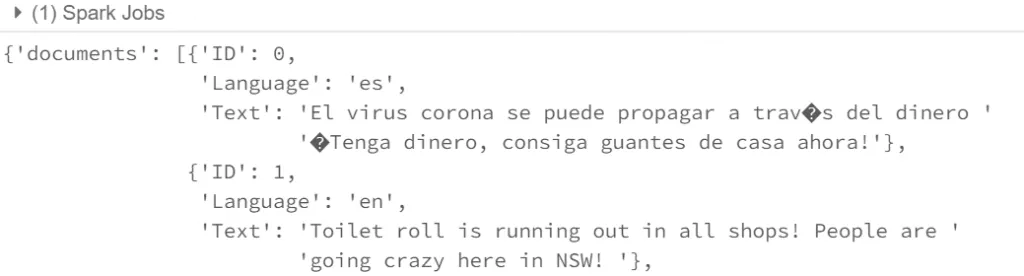
Inspect and flatten the response
The API returned a result for each document identifier.
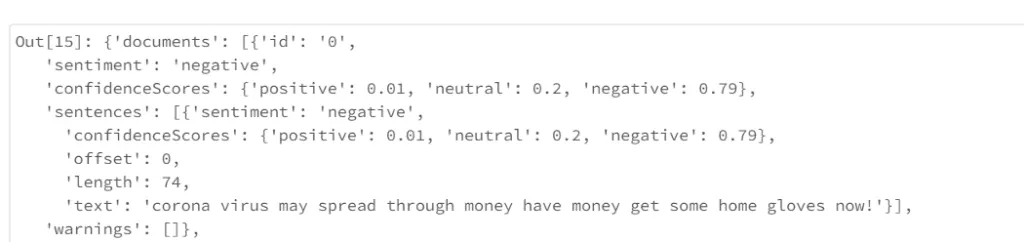
The original notebook converted the returned documents into a Spark DataFrame and selected sentiment and confidence values:
from pyspark.sql.functions import col
results = spark.read.json(    spark.sparkContext.parallelize(payload["documents"]))
scores = results.select(    col("id").alias("ID"),    col("sentiment").alias("Sentiment"),    col("confidenceScores.positive").alias("Positive"),    col("confidenceScores.neutral").alias("Neutral"),    col("confidenceScores.negative").alias("Negative"),)
final = prepared.join(scores, prepared.ID == scores.ID, "left").drop(scores.ID)
Validate before interpreting the result
A sentiment score is a model output, not a fact about the customer or writer. Test the current model against representative language, domain terms, sarcasm, short text, and the languages present in the dataset.
Record the service version, input policy, evaluation set, and intended use. Do not use a general sentiment label as an automated decision about a person without a separate risk and governance review.
Databricks
Delta Lake and Spark Lakehouse Webinar
An archived Sydney Databricks Meetup session on building an ingestion pipeline with Delta Lake and Spark, with source details retained.
Databricks
Titanic Data Engineering with Databricks and Python
An archived Tech Talk showing how the Titanic dataset was prepared and engineered in Databricks before model training.
Databricks
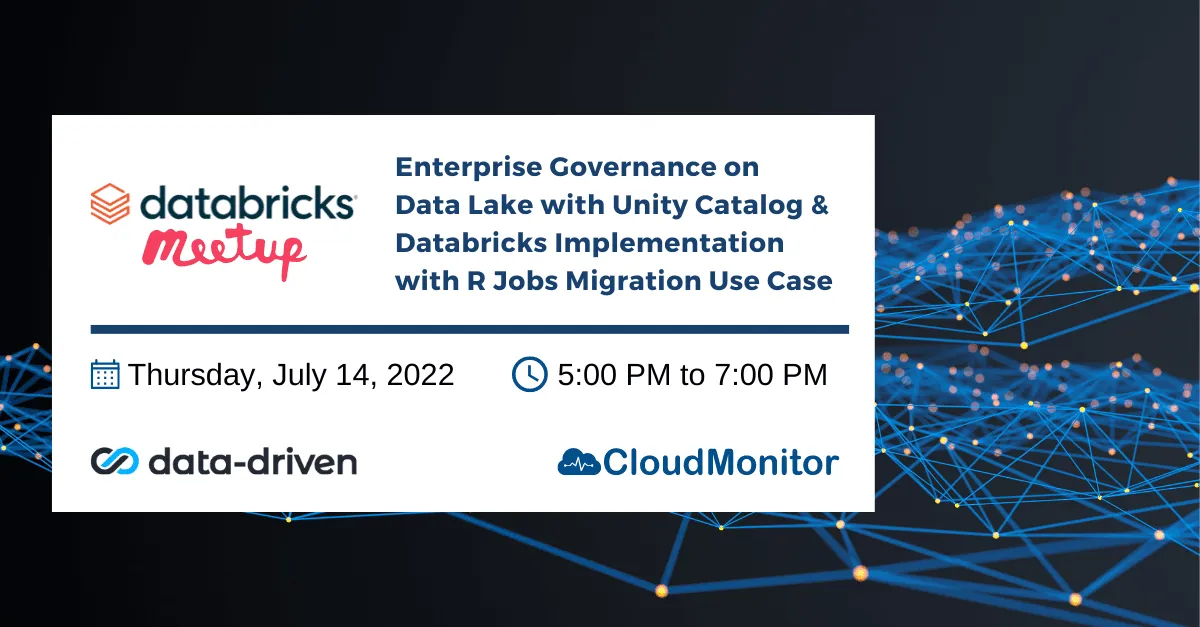
Unity Catalog Governance and R Migration Meetup
An archived Sydney Databricks Meetup on Unity Catalog governance and a customer implementation that migrated existing R jobs.
Turn the article into a practical next step
Bring the use case, constraints, and current platform. We can help you identify what to test or decide next.
'%3e%3cpath%20style='%20stroke:none;fill-rule:nonzero;fill:%230078d4;fill-opacity:1;'%20d='M%20130.835938%200.808594%20L%20246.300781%200.808594%20L%20126.433594%20355.867188%20C%20125.824219%20357.679688%20124.929688%20359.386719%20123.792969%20360.925781%20C%20122.65625%20362.46875%20121.285156%20363.816406%20119.726562%20364.933594%20C%20118.171875%20366.050781%20116.457031%20366.917969%20114.628906%20367.5%20C%20112.804688%20368.085938%20110.902344%20368.386719%20108.992188%20368.386719%20L%2019.128906%20368.386719%20C%2016.214844%20368.386719%2013.335938%20367.695312%2010.742188%20366.359375%20C%208.144531%20365.03125%205.902344%20363.097656%204.199219%20360.726562%20C%202.496094%20358.355469%201.382812%20355.613281%200.949219%20352.730469%20C%200.515625%20349.84375%200.78125%20346.894531%201.710938%20344.132812%20L%20113.386719%2013.320312%20C%20113.996094%2011.507812%20114.890625%209.800781%20116.03125%208.261719%20C%20117.167969%206.722656%20118.542969%205.371094%20120.09375%204.253906%20C%20121.648438%203.140625%20123.367188%202.273438%20125.191406%201.6875%20C%20127.015625%201.101562%20128.917969%200.800781%20130.832031%200.800781%20L%20130.832031%200.804688%20Z%20M%20130.835938%200.808594%20'%3e%3c/path%3e%3c/g%3e%3cg%20clip-rule='nonzero'%20clip-path='url(%23b1ce87f571)'%3e%3cpath%20style='%20stroke:none;fill-rule:nonzero;fill:%2302b2fe;fill-opacity:1;'%20d='M%20485.054688%200.800781%20L%20404.832031%200.800781%20C%20391.472656%200.800781%20380.636719%2011.625%20380.636719%2024.976562%20L%20380.636719%20316.339844%20L%20278.34375%2013.316406%20C%20278.03125%2012.417969%20277.679688%2011.5625%20277.210938%2010.703125%20C%20276.78125%209.84375%20276.273438%209.027344%20275.6875%208.246094%20C%20275.414062%207.855469%20275.101562%207.503906%20274.792969%207.15625%20C%20274.441406%206.765625%20274.128906%206.414062%20273.777344%206.101562%20C%20273.113281%205.402344%20272.410156%204.816406%20271.628906%204.269531%20C%20270.070312%203.140625%20268.351562%202.28125%20266.558594%201.695312%20C%20264.722656%201.113281%20262.8125%200.800781%20260.898438%200.800781%20L%20132.210938%200.800781%20C%20134.121094%200.800781%20136.03125%201.113281%20137.867188%201.695312%20C%20139.660156%202.28125%20141.378906%203.140625%20142.941406%204.269531%20C%20145.671875%206.21875%20147.816406%208.871094%20149.144531%2011.949219%20C%20149.222656%2012.144531%20149.300781%2012.300781%20149.339844%2012.496094%20C%20149.457031%2012.769531%20149.574219%2013.042969%20149.652344%2013.316406%20L%20261.328125%20344.128906%20C%20261.367188%20344.246094%20261.40625%20344.363281%20261.40625%20344.480469%20L%20265.269531%20355.863281%20C%20265.894531%20357.695312%20266.792969%20359.375%20267.921875%20360.933594%20C%20269.054688%20362.453125%20270.421875%20363.816406%20271.980469%20364.949219%20C%20273.542969%20366.039062%20275.257812%20366.898438%20277.054688%20367.484375%20C%20278.886719%20368.066406%20280.800781%20368.378906%20282.710938%20368.378906%20L%20404.660156%20368.378906%20C%20404.71875%20368.378906%20404.773438%20368.386719%20404.832031%20368.386719%20L%20485.054688%20368.386719%20C%20498.417969%20368.386719%20509.25%20357.566406%20509.25%20344.214844%20L%20509.25%2024.976562%20C%20509.25%2011.625%20498.417969%200.800781%20485.054688%200.800781%20Z%20M%20485.054688%200.800781%20'%3e%3c/path%3e%3c/g%3e%3c/g%3e%3c/svg%3e)










