Azure SQL · Dated technical reference
Why developers still choose Azure SQL
Review the Azure SQL capabilities that matter for analytics projects, including storage, concurrency, security, monitoring, pricing, and deployment choices.
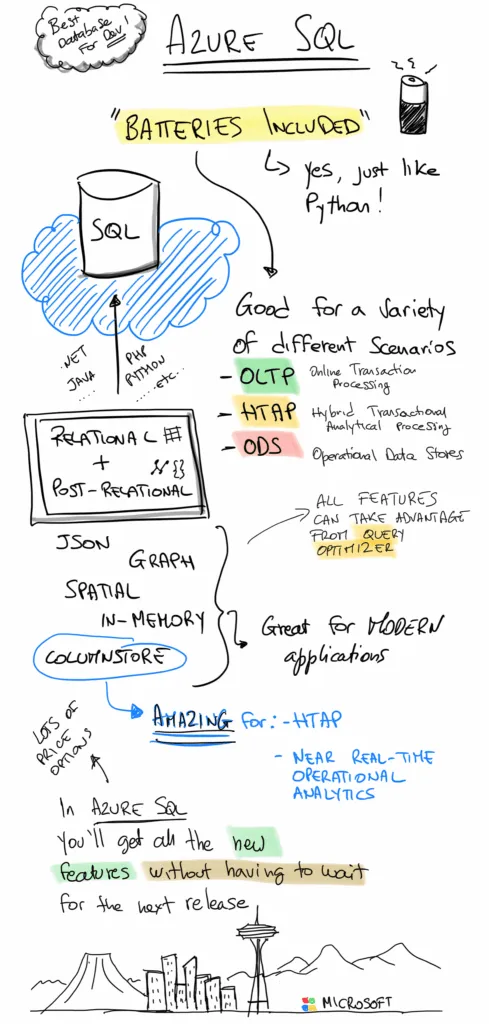
Azure SQL combines a relational engine with features for JSON, graph, spatial, analytical, and transactional workloads. That breadth can reduce the number of data services an application must coordinate.
This article was first published in 2020. The capabilities remain useful design prompts, but service tiers, limits, interfaces, and prices change. Confirm the current documentation before making an architecture decision.
Start with the data shapes your application needs
Azure SQL supports relational tables alongside JSON, graph, and spatial data. That can be useful when one application needs several data shapes but still benefits from transactions and SQL tooling.
Microsoft documents the current behaviour for JSON data, SQL graph, and spatial data. Check the supported syntax and service scope for the Azure SQL option you plan to use.
Choose rowstore, columnstore, or both
Rowstore indexes suit selective lookups and transactional access. Columnstore indexes can improve large scans and aggregations. Some systems use both so operational and analytical queries can share a database without sharing the same access pattern.
The choice should follow measured queries, data volume, write behaviour, and latency targets. Use Microsoft’s current guides to rowstore indexes and columnstore indexes as the starting point.
Plan for concurrency and history
Memory-optimised tables use multi-version concurrency techniques for workloads that need high concurrency. They add operational and design choices, so benchmark them with the transaction shape you expect rather than relying on headline throughput.
Temporal tables keep row history and support “as of” queries. They can help with audits, investigation, and reporting when retention and storage growth are planned. Review memory-optimized tables and temporal tables before selecting either feature.
Combine security controls deliberately
Azure SQL includes encryption, Always Encrypted, row-level security, and dynamic data masking. Each control addresses a different boundary.
- Encryption protects data at defined stages, depending on the feature and configuration.
- Row-level security filters rows according to a policy.
- Dynamic data masking changes how selected values appear to some users.
- Always Encrypted keeps selected values encrypted outside trusted client processing.
None of these controls makes an application compliant by itself. Identity, key management, network access, monitoring, testing, and operating procedures still matter. Microsoft’s encryption overview and row-level security guide define the current boundaries.
Use the optimizer, then inspect the evidence
SQL describes the result a query needs. The optimizer chooses an execution plan from the available statistics, indexes, resources, and operators.
That does not remove the need to inspect slow or expensive queries. Execution plans, Dynamic Management Views, Query Store, and Extended Events expose different parts of database behaviour. Start with the query processing architecture guide and the Dynamic Management Views catalogue.
Treat service tier and deployment as separate decisions
Azure SQL includes several deployment options and service tiers. Serverless compute and elastic pools can help in particular usage patterns, but neither guarantees a lower bill.
Compare measured demand, pause behaviour, storage, resilience, network design, and operational ownership. Then confirm current limits and prices in the vCore service-tier documentation, serverless overview, and elastic pool overview.
Use the themes as a review, not a verdict
The original themes were data shapes, rowstore, columnstore, memory optimisation, temporal history, security controls, transaction isolation, query optimisation, observability, and deployment choice.
For a new project, turn each theme into a test:
- Which queries and writes matter most?
- Which controls protect the data at each boundary?
- Which operational signals will the team watch?
- Which tier meets the target under realistic load?
- What would make the team revisit the decision?
Original author: Davide Mauri, then Senior Program Manager for Azure SQL.
Azure
Low-Code Developer Productivity with Power Platform
See where low-code can reduce repetitive work, speed delivery, and support governance, plus the evidence to check before using benchmark figures.

Azure
How AI Changes Business Operations and Decisions
See common AI use cases across decisions, automation, customer service, operations, and products, with questions to test value.

Azure
Azure Integrated Stack: A Workload Planning Guide
Map Azure infrastructure, data, AI, DevOps, IoT, and virtual desktop services to a defined workload and operating model.
Turn the article into a practical next step
Bring the use case, constraints, and current platform. We can help you identify what to test or decide next.
'%3e%3cpath%20style='%20stroke:none;fill-rule:nonzero;fill:%230078d4;fill-opacity:1;'%20d='M%20130.835938%200.808594%20L%20246.300781%200.808594%20L%20126.433594%20355.867188%20C%20125.824219%20357.679688%20124.929688%20359.386719%20123.792969%20360.925781%20C%20122.65625%20362.46875%20121.285156%20363.816406%20119.726562%20364.933594%20C%20118.171875%20366.050781%20116.457031%20366.917969%20114.628906%20367.5%20C%20112.804688%20368.085938%20110.902344%20368.386719%20108.992188%20368.386719%20L%2019.128906%20368.386719%20C%2016.214844%20368.386719%2013.335938%20367.695312%2010.742188%20366.359375%20C%208.144531%20365.03125%205.902344%20363.097656%204.199219%20360.726562%20C%202.496094%20358.355469%201.382812%20355.613281%200.949219%20352.730469%20C%200.515625%20349.84375%200.78125%20346.894531%201.710938%20344.132812%20L%20113.386719%2013.320312%20C%20113.996094%2011.507812%20114.890625%209.800781%20116.03125%208.261719%20C%20117.167969%206.722656%20118.542969%205.371094%20120.09375%204.253906%20C%20121.648438%203.140625%20123.367188%202.273438%20125.191406%201.6875%20C%20127.015625%201.101562%20128.917969%200.800781%20130.832031%200.800781%20L%20130.832031%200.804688%20Z%20M%20130.835938%200.808594%20'%3e%3c/path%3e%3c/g%3e%3cg%20clip-rule='nonzero'%20clip-path='url(%23b1ce87f571)'%3e%3cpath%20style='%20stroke:none;fill-rule:nonzero;fill:%2302b2fe;fill-opacity:1;'%20d='M%20485.054688%200.800781%20L%20404.832031%200.800781%20C%20391.472656%200.800781%20380.636719%2011.625%20380.636719%2024.976562%20L%20380.636719%20316.339844%20L%20278.34375%2013.316406%20C%20278.03125%2012.417969%20277.679688%2011.5625%20277.210938%2010.703125%20C%20276.78125%209.84375%20276.273438%209.027344%20275.6875%208.246094%20C%20275.414062%207.855469%20275.101562%207.503906%20274.792969%207.15625%20C%20274.441406%206.765625%20274.128906%206.414062%20273.777344%206.101562%20C%20273.113281%205.402344%20272.410156%204.816406%20271.628906%204.269531%20C%20270.070312%203.140625%20268.351562%202.28125%20266.558594%201.695312%20C%20264.722656%201.113281%20262.8125%200.800781%20260.898438%200.800781%20L%20132.210938%200.800781%20C%20134.121094%200.800781%20136.03125%201.113281%20137.867188%201.695312%20C%20139.660156%202.28125%20141.378906%203.140625%20142.941406%204.269531%20C%20145.671875%206.21875%20147.816406%208.871094%20149.144531%2011.949219%20C%20149.222656%2012.144531%20149.300781%2012.300781%20149.339844%2012.496094%20C%20149.457031%2012.769531%20149.574219%2013.042969%20149.652344%2013.316406%20L%20261.328125%20344.128906%20C%20261.367188%20344.246094%20261.40625%20344.363281%20261.40625%20344.480469%20L%20265.269531%20355.863281%20C%20265.894531%20357.695312%20266.792969%20359.375%20267.921875%20360.933594%20C%20269.054688%20362.453125%20270.421875%20363.816406%20271.980469%20364.949219%20C%20273.542969%20366.039062%20275.257812%20366.898438%20277.054688%20367.484375%20C%20278.886719%20368.066406%20280.800781%20368.378906%20282.710938%20368.378906%20L%20404.660156%20368.378906%20C%20404.71875%20368.378906%20404.773438%20368.386719%20404.832031%20368.386719%20L%20485.054688%20368.386719%20C%20498.417969%20368.386719%20509.25%20357.566406%20509.25%20344.214844%20L%20509.25%2024.976562%20C%20509.25%2011.625%20498.417969%200.800781%20485.054688%200.800781%20Z%20M%20485.054688%200.800781%20'%3e%3c/path%3e%3c/g%3e%3c/g%3e%3c/svg%3e)










